SEIPID Registry
Use this guide to understand the SEIPID Registry, search scholarly platforms and outputs, and explore public metadata records, identifier resolution and other Registry features.
What Is the SEIPID Registry?
The SEIPID Registry is the public metadata record system within the SEIPID infrastructure. It maintains independent records for scholarly platforms identified by NiDs and scholarly outputs identified by SEIPIDs. These records provide human-readable information, structured metadata for AI systems and search engines, registered references, ready-to-use citations and reusable scholarly data. Available public SEIPID Idraak metrics provide insights into citation connections and other scholarly activity associated with these records.
The public metadata available under CC0 in NiD and SEIPID records reflects the information supplied by the registering platform. Required and optional fields vary by record type, and the applicable, available information is structured using supported metadata standards.
How Do I Open a Public Record Using Its Identifier?
You can open the public metadata record for a NiD or SEIPID in two ways: through the Registry search page or by using a direct Registry link.
-
Search the Registry
On the SEIPID Registry Search page, search by platform name, output title, NiD (e.g.
001:xijir) or SEIPID (e.g.001:xijir:2026n1), as explained in the search guide below. -
Open a direct link
Enter a complete link in your browser's address bar. The address you use determines what opens:
Example link What opens seipid.com/001:xijir Resolves to the platform's public metadata page. seipid.com/001:xijir:2026n1 Resolves to the output's registered source when available; otherwise, its public metadata page. seipid.com/registry/001:xijir Resolves to the platform's public metadata page. seipid.com/registry/001:xijir:2026n1 Resolves to the output's public metadata page.
How Do I Use the SEIPID Registry Search Page?
Follow the numbered controls to find scholarly platforms and outputs, choose where a result opens, and explore your search results. Try the example views below to see how the interface responds.
SEIPID Registry Find Scholarly Platforms and Outputs
Search by platform name, output title, NiD or SEIPID.
Recently registered outputs
Showing 2 recordsNo matching records found. Try another title, platform name or identifier.
-
Enter a platform name, output title, NiD, SEIPID or complete SEIPID URL in the search box.
-
Choose Public metadata to view the record, or Registrant (resolver) to follow its registered destination.
-
All Types is selected by default; choose Scholarly Platforms or Scholarly Outputs to narrow your public metadata search.
-
Click Search to open an exact match or display matching records for your query.
-
Check this line for search updates and instructions while you type or after clicking Search.
-
Recent records appear by default, and results update as you type in the search box. Click any available record to open its public metadata. If no records match your search, a no-match message appears.
-
Click Load more to display additional records.
-
See less appears after you load more records; click it to return to the initial list.
What Can I Find on a NiD Public Record?
A scholarly platform is identified by a NiD. Its public record is backed by structured, machine-readable metadata for AI systems and search engines, supporting discovery, indexing and reuse. The record brings together the platform’s registered identity, descriptive information, scholarly outputs and available public SEIPID Idraak metrics. You can explore its information through Overview, browse Scholarly Outputs, and view SEIPID Idraak metrics through the Citations tab.

What Can I See in Overview?
Use Overview to read the platform’s description, registered details and available public highlights. It also brings together recent scholarly outputs and supporting information such as registration status, website details, policies and contact links.
What Can I Find under Scholarly Outputs?
Select Scholarly Outputs to browse the works registered under this NiD. Search by title, author or SEIPID, and use the available year and ordering controls. Click an output title to open its public metadata record, or its SEIPID to resolve to the registered source when available.
How Do I View SEIPID Idraak Metrics for This NiD?
Select Citations to view available public SEIPID Idraak metrics for the NiD, including citation summaries, sources, time trends and indices. Choose a time period to explore the information shown for that range. Publicly shared SEIPID Idraak Plus cards may also appear.
Platforms, agencies and other interested users can purchase detailed platform-specific analysis through SEIPID Idraak Plus from SEIPID.
What Can I Find on a SEIPID Public Record?
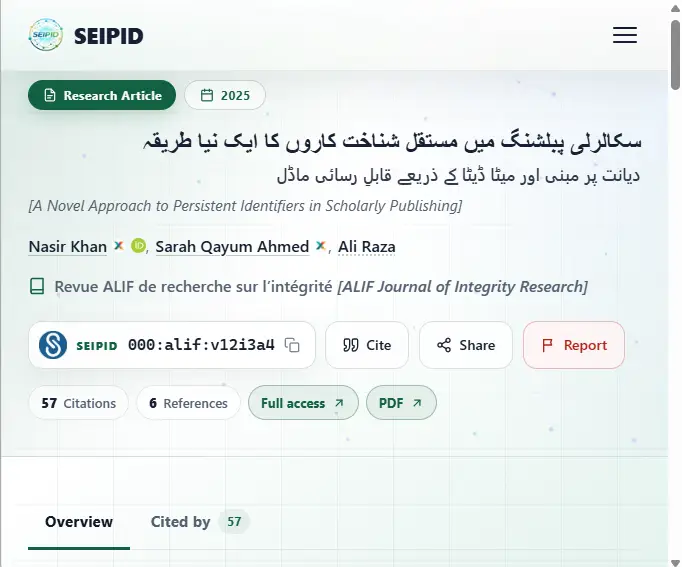
A scholarly output is identified by a SEIPID. Its public record is backed by structured, machine-readable metadata for AI systems and search engines, supporting discovery, indexing and reuse. The record brings together registered information about an individual scholarly work, such as an article, book, dataset or thesis, including its description, contributors and publication details. You can explore available references, citing works and access links, and copy or export citations and scholarly metadata.
What Can I See in Overview?
Open Overview to read the work’s title, contributors, summary or abstract and available keywords. The record header also provides its SEIPID, content type, key publication information and available links to the original source or files.
How Do I Read the Full Metadata Record?
The Metadata Record groups the information registered for the work, including its identity, publication details, contributors, dates and other relevant fields. Select Show full metadata to expand the additional groups and review the available details.
What Can I Find in References?
Use References to review the reference list registered for the work and follow any available identifiers or source links. When a longer list is provided, use Show all references to expand it.
How Do I View SEIPID Idraak Metrics for This Output?
To view citation metrics for a particular SEIPID, open its Cited by tab. Here you can explore the works recorded as citing it, available public citation information, citation sources and time-based views. Citation connections are discovered and tracked through SEIPID Rasad. Additional publicly shared analysis may also be visible.
How Do I Cite or Export This Record?
Select Cite to choose an available citation style and copy a ready-to-use citation. Use the available download or metadata options to export a format suited to reference managers or other scholarly tools.
Frequently Asked Questions (FAQs)
What is the difference between a Namespace ID (NiD) and a SEIPID?
A NiD identifies a registered scholarly platform and is issued after successful namespace registration. The platform has its own public record, whether or not it has registered any scholarly outputs.
A SEIPID identifies an individual scholarly output registered under that NiD, such as an article, book, thesis, or dataset. Each registered output receives its own unique, persistent SEIPID.
For example, a journal has its own NiD, while each article registered under that journal receives its own SEIPID.
How should I cite a scholarly work using its SEIPID?
Use the citation style required by your publication or institution and include the work’s SEIPID resolver URL, such as https://seipid.com/001:xijir:2026n1. Include the usual authorship, title, publication date, and source details. The public record provides ready-to-use citation formats and citation exports. A platform’s NiD identifies the platform and should not replace an individual work’s SEIPID in a citation to that work.
Why Can’t I Find a Record in the Registry?
Check the spelling, try the complete NiD or SEIPID, and confirm that the record-type filter matches what you are searching for. Select All Types if you are unsure.
The Registry search returns available public records for platforms and outputs registered with SEIPID. If you still cannot find the expected record, confirm the identifier with the registering platform or contact SEIPID.
How Can I Report Incorrect Metadata?
Open the relevant NiD or SEIPID public record and select Report. Choose the appropriate reason, describe the issue, and provide supporting details or links. Sign in when prompted and submit your report for review. You can also contact SEIPID through its official contact page.
Where Does SEIPID Idraak Get Its Citation Information?
SEIPID Idraak uses citation connections discovered and tracked through SEIPID Rasad (رصد). Rasad examines registered records and references in the SEIPID Registry, integrates external scholarly data, and uses web crawling and search-assisted discovery to identify and track connections. Source labels show whether the citing work is present in the Registry: SEIPID Registry when it is, and SEIPID Rasad otherwise.